



Head of eDiscovery, Ben Hammerton, who is seeing a rise in interest in the use of AI (Augmented Intelligence) features within document review platforms, discusses their benefits, but also the need to better understand the basic functionality and workflows first.
eDiscovery, in a nutshell, ensures that legal reviews (and other types of document review) are as efficient as possible (in terms of speed and cost), by reducing the ‘review’ population down to a sensible and proportionate size, through the use of technology.
However, as technology continues to improve, and new features are added to the eDiscovery platforms, it can be easy to lose sight of the basics (which are at the core of every review), which should accompany any ‘Technology Assisted Review’ (TAR) exercise.
What is the current trend?
As always, increasing data volumes are the biggest concern to clients and their legal advisers due to the obvious increase in time and costs in reviewing them for relevance to the matter in hand. More and more ways in which to communicate (email, webmail, SMS, Messenger, Wechat, Whatsapp, Signal, Telegram, Teams) are dramatically increasing the volumes and the difficulties in reviewing them.
Savvy clients and their advisers are keen to utilise the latest legal technology to reduce volumes and prioritise the most relevant documents, leading to reduced costs – which of course makes perfect sense. However, some of the most useful and sophisticated features contained within eDiscovery platforms can create complex workflows that may sometimes slow down the process, lead to analysis paralysis or, worse still, introduce errors.
The use of such features should be considered in almost every matter, but not all matters will benefit from them, so some simple steps will help work out the best route to take.
Start with a sensible workflow – no need for complexity
Every legal review has broadly the same requirements, and so a basic workflow will undoubtedly look something like this:
1. Collection
- Client/Legal Advisers/Vendor discuss the data locations, data items (laptop/desktop/server/smartphone) and determine the quickest and most ‘cost-effective’ way to collect the data (also ensuring the process is defensible)
- In many cases, the data can be collected ‘Remotely’ via various easy to use tools (webmail such as Office365 and Gmail being extremely simple)
- In certain scenarios it may require a data collection expert to attend client site to create ‘images’ of computer hardware or copy specific data from the server
2. Data triage
- Whilst this isn’t always necessary (or possible), it makes good monetary sense to perform some simple data ‘triage’ prior to loading data to the review platform, and in other cases it might be a requirement due to data protection/PII issues. ‘Triage’ may include filtering such as excluding:
- certain file types
- specific date ranges
- unnecessary custodians
- obviously unnecessary ‘domains’ e.g. @bbc, @internalnewsletter, @client
- Importantly, this step will lower the overall data volumes and therefore costs going forward, and the vendor providing the eDiscovery platform should have the capability to perform this step.
3. Data processing/loading
- Data is loaded into the platform (usually by the vendor, but increasingly the tools offer the client/lawyers the option of uploading themselves)
- De-duplication is performed to reduce unnecessary copies of the same documents
- OCR (Optical Character Recognition) is performed to ensure all documents are text-searchable (TIFF, JPEG scans and some PDF files are not initially searchable)
4. Filtering/Foldering
- Additional ‘Positive’ and ‘Negative’ searches may be performed to either set aside unnecessary documents, or create folders of documents most likely requiring review.
5. Review
- Documents are tagged for relevance, or in relation to various ‘issues’, typically in a 2 or 3 phase process (but sometimes all in one ‘pass’):
- 1st Pass – reviewers are tagging for initial relevance
- 2nd Pass – senior reviewers assess documents that have been tagged with certain criteria from the 1st Pass, plus Privilege or Confidentiality review
- Additional passes – to either deep dive into facts, or sort the documents prior to Disclosure
So the above workflow represents the core phases of a legal document review process and, whilst there are 5 phases, Collection (1) along to Filtering/Foldering (4) are typically short calls and emails between the vendor and the client/lawyers to get things set up, and in practice require only a small amount of liaison.
The bulk of the work occurs once the newly created ‘Review Universe’ has been created on the platform and access has been granted to the review team.
Split out the work – stay organised
Even if your case is relatively small, a few thousand emails/documents can be unwieldy depending on the scope of the review. In large cases, the level of organisation of the ‘review population’ needs careful planning to ensure it stays on track and resources aren’t wasted.
There are some very simple mechanisms that can be employed to maintain an efficient review process and organise the data:
- Search folders – based on keywords/phrases
- Batching – subsets of up to 200 docs from those search folders, ‘batched’ out to the review team
Some matters may require a fairly simple review to be undertaken by a small review team and, in such instances, the likelihood is that the legal team would test out keywords, create folders of documents from those keyword searches, and review/tag them in order to arrive at a ‘Disclosure Set’.
In more complex matters, or those with large document volumes, this is where the more sophisticated AI and TAR features provide the most benefit.
But what about the AI? – regardless of data volumes, this is where it gets more interesting
So I’ve said that every case should follow the same basic workflow, and some cases require more thought in terms of utilising AI and TAR technology, but let’s start with two sophisticated features that can be used on any size case to great effect:
1. Image Labelling
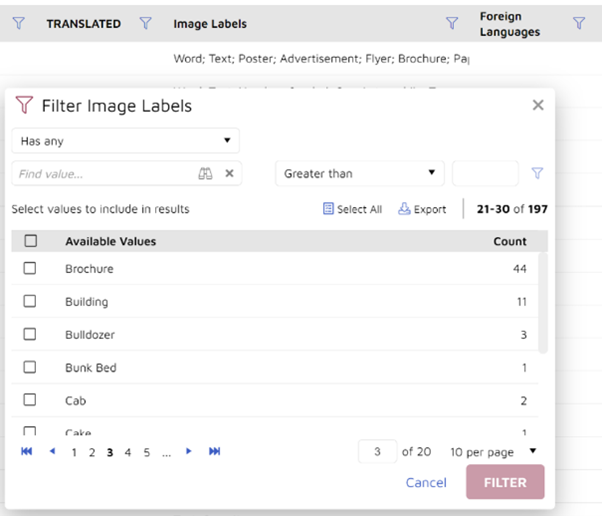
- The system will use AI to put ‘labels’ on images (photos, images in documents) that can then be used to zero in on the images that could be relevant
- Some examples:
- Construction Litigation
- “Bulldozer”, “Soil”, “Hill” – find pictures of construction equipment ranging from digging tools to bridge-building apparatus, and returns pictures of building sites
- Internal Investigation/Employment
- “Computer Screen” may bring back pictures taken of confidential company information, “QR Code” may find travel or hotel pictures to show expense claims, or suggest time spent on unnecessary tasks/searches
- Fraud/Asset Tracing
- “Watch”, “Boat”, “Ferrari”, “Cash” may bring back pictures of items with high value
- Construction Litigation
2. Sentiment Analysis
- Rather than relying on keywords such as ‘Angry’, ‘Upset’, ‘Disappointing’ which are of course very narrow in focus, the system analyses words and their correlation to one another, plus indicators of sentiment such as conspiration, intent, happiness, anger (including overuse of upper case characters), to return email conversations of interest.
- Recent examples brought to the surface by the feature:
- I told her that I was disappointed with her ‘clique’
- This is creating a toxic atmosphere
- The accident could have been easily and cheaply avoided
- You wasted lots of time and not willing to allow it to happen again
- I am very concerned with the error made
- This was a dodgy position
- HOW DID THIS HAPPEN?
- I am not responsible and will not cover costs

However, probably the most widely talked about version of AI has a number of different labels, such as ‘Machine Learning’, ‘Technology Assisted Review (TAR)’, ‘Computer Assisted Learning (CAL)’ as well as its original moniker of ‘Predictive Coding’.
3. Machine Learning/Technology Assisted Review (TAR)/Computer Assisted Learning (CAL)
Whatever the label, the general premise is that the platform will ‘learn’ from the tagging/coding decisions made by the human reviewer by analysing multiple fields of ‘metadata’ contained in the email/document (to/from, author, creation date, modified date and many more), alongside the textual content of the document.
This analysis then allows the system to assign a form of ‘likely relevance score’ to all the remaining unreviewed documents, which can then be used to create folders of the most likely useful documents, which can form the basis of the main thrust of the review.
My analogy would be to think of the system shuffling a deck of cards in reverse (after being taught what cards are most useful) and presenting you with a hand full of face cards (King, Queen, Jack).
Over the years, the technology has been overly complicated by those describing it, but the summary is simple:
1. Review a random set of documents/emails and tag as relevant/not relevant
2. Look at the resulting ‘relevance ranking’ and place into folders e.g.
- 95%+ ‘likely relevance’ = priority docs for immediate review
- 85-95% = 2nd priority
- 50-85% = for consideration after 1st and 2nd
- 50% and lower = for ‘sampling’ and QC checking
3. Review folders based on the requirements
4. Provide statistics to opposition or judge as required
- + Potentially combine with keywords to further narrow down
Once upon a time there was a lot of upfront time and expense in getting it set up, training the system, and managing the results, but now it is incorporated into the system and runs without any need for human intervention, and you can simply choose whether or not to use the results based on the % folders that are created and how they suit your case workflow.

Summary
There are a variety of extremely beneficial time/cost saving features in eDisclosure/eDiscovery document review platforms and, as long as you follow a straightforward workflow, it is incredibly easy to then overlay that workflow with the more sophisticated features. The basic workflow is therefore:
- Start simple – utilise any obvious ‘positive’ or ‘negative’ searches, run initial keywords to enable splitting out large volumes into batches
- Analyse ‘review accelerators’ – such as ‘email threading’, ‘near duplicate detection’, ‘Image Labelling’ and ‘Sentiment Analysis’, to get to potentially important docs/emails immediately
- Analyse ‘machine learning’ – by seeing what % likely relevance folders contain and perhaps using those as initial review folders
Hopefully what seems simple to me isn’t perplexing to others, but the clear message here is that all cases will benefit from using such legal technology, and even the seemingly complex AI features are easy to use and incorporate into the document review phase of a matter.